---
title: "Modules"
canonical: https://trickest.com/docs/key-concepts/building-blocks/modules
description: "Reuse a workflow inside another workflow through a defined set of inputs and outputs."
---
# Modules
## What is a Module Node
A **module** is a reusable workflow that appears as one node inside another workflow. Its internal graph can contain tools, scripts, and other modules. The caller connects to the inputs and outputs exposed by that graph.
For example, a module can discover subdomains, resolve them, and format the results. A larger workflow supplies the target domain and consumes the final list without drawing every internal step again.
## Why Modules Exist
Use a module when several workflows need the same process, or when a large canvas needs a meaningful group of steps. A module is a reusable graph, not a Docker image or a guarantee that all its work runs on one machine. Its internal nodes still execute according to their dependencies and the selected fleet's capacity.
## How It Works
Create a module from a workflow, choose which inputs callers can configure, and expose the outputs they need. Adding the module to another workflow creates an instance with its own input values and connections.
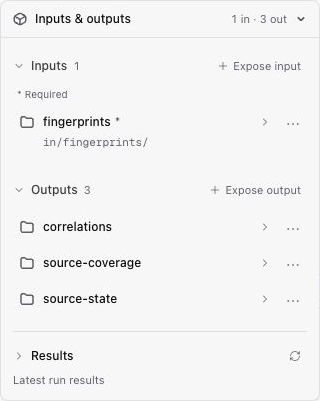 Give exposed inputs clear names and descriptions. Keep internal implementation parameters private unless callers need to change them. An output must correspond to a result the internal workflow actually produces.
## Changes and run history
Changes to a module can affect workflows that use it. After updating its inputs, outputs, or internal graph, open the calling workflow and review any update warnings and connections before running it. Do not assume an existing instance will always keep an older Library version.
A past run preserves the configuration used for that execution. Inspecting it is different from editing the latest module. Access to a module's internal graph also depends on its visibility and your permissions.
## Inspecting failures
Start with the module's status and outputs in the calling run. Where internal execution details are available, identify the failing node and task, then inspect its logs and supplied inputs. A single module on the canvas can represent many internal jobs, including distributed tasks.
## Next Steps
[Creating and Using Modules](/docs/using-the-app/workflow-and-executions/creating-and-using-modules) explains the editor controls, eligibility of exposed inputs and outputs, and how to reuse the module.
---
_Markdown source of https://trickest.com/docs/key-concepts/building-blocks/modules._
Give exposed inputs clear names and descriptions. Keep internal implementation parameters private unless callers need to change them. An output must correspond to a result the internal workflow actually produces.
## Changes and run history
Changes to a module can affect workflows that use it. After updating its inputs, outputs, or internal graph, open the calling workflow and review any update warnings and connections before running it. Do not assume an existing instance will always keep an older Library version.
A past run preserves the configuration used for that execution. Inspecting it is different from editing the latest module. Access to a module's internal graph also depends on its visibility and your permissions.
## Inspecting failures
Start with the module's status and outputs in the calling run. Where internal execution details are available, identify the failing node and task, then inspect its logs and supplied inputs. A single module on the canvas can represent many internal jobs, including distributed tasks.
## Next Steps
[Creating and Using Modules](/docs/using-the-app/workflow-and-executions/creating-and-using-modules) explains the editor controls, eligibility of exposed inputs and outputs, and how to reuse the module.
---
_Markdown source of https://trickest.com/docs/key-concepts/building-blocks/modules._