---
title: "Scripts"
canonical: https://trickest.com/docs/key-concepts/building-blocks/scripts
description: "Use code, arguments, and file inputs to transform data inside a workflow."
---
# Scripts
## What is a Script Node
A **script node** runs code in a container as part of a workflow. Use it to filter tool output, convert formats, call an API, or produce a report. Its runtime is separate from your laptop and from an agent's sandbox.
## Script Types
Choose **Bash**, **Python**, **Go**, or **Node.js**. The node provides the language runtime; install additional packages inside that environment or package them in a private tool image. Installing a dependency elsewhere does not make it available to the node.
## How It Works
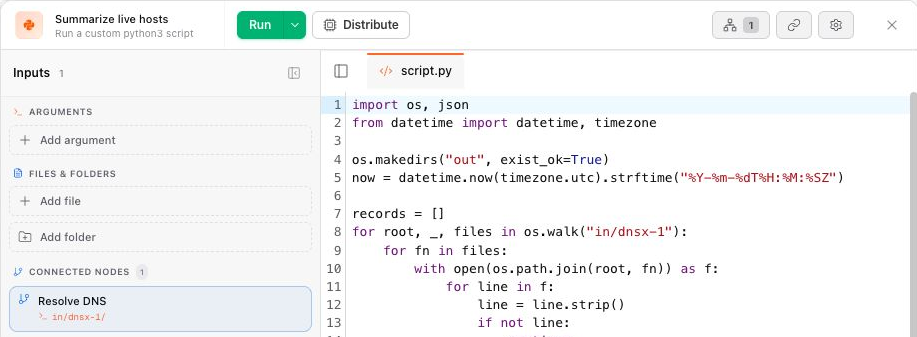
The inspector separates three kinds of input:
| Input | Purpose |
|---|---|
| Arguments | Flags and positional values passed to the script. The editor can detect supported argument definitions in your code. |
| Files & Folders | Files supplied by URL, upload, or storage. |
| Connected Nodes | Paths mounted from upstream node outputs. |
Check the displayed path before reading an input. Script commands run from `/hive`; connected files are mounted below `in/`. Write results below `out/` so Trickest can collect them. `out/output.txt` is the conventional result for a downstream file connection, while a folder connection can carry multiple result files.
A folder is not automatically converted into one file, and changing a port type does not convert JSON to text or CSV. Your script must produce the content the downstream tool expects.
 ## Check a script before reusing it
Run a small input first. Inspect both the console and the output files: a command can exit successfully while producing an empty or malformed result. Fail explicitly when required inputs or dependency installation are missing.
When viewing a past run, the script is a read-only record of what executed. Return to the editable workflow before changing the code. A new run uses the updated definition; it does not rewrite earlier results.
## Common Patterns
- Parse JSON and emit the hostname field as one line per host.
- Combine and deduplicate files from several upstream nodes.
- Generate a report while preserving structured data for a Live Table.
- Adapt a Library script instead of rebuilding its argument and input handling.
## Next Steps
[Using Scripts](/docs/using-the-app/workflow-and-executions/using-scripts) covers adding a script, input paths, argument detection, dependency installation, and complete examples in each language.
---
_Markdown source of https://trickest.com/docs/key-concepts/building-blocks/scripts._
## Check a script before reusing it
Run a small input first. Inspect both the console and the output files: a command can exit successfully while producing an empty or malformed result. Fail explicitly when required inputs or dependency installation are missing.
When viewing a past run, the script is a read-only record of what executed. Return to the editable workflow before changing the code. A new run uses the updated definition; it does not rewrite earlier results.
## Common Patterns
- Parse JSON and emit the hostname field as one line per host.
- Combine and deduplicate files from several upstream nodes.
- Generate a report while preserving structured data for a Live Table.
- Adapt a Library script instead of rebuilding its argument and input handling.
## Next Steps
[Using Scripts](/docs/using-the-app/workflow-and-executions/using-scripts) covers adding a script, input paths, argument detection, dependency installation, and complete examples in each language.
---
_Markdown source of https://trickest.com/docs/key-concepts/building-blocks/scripts._