---
title: "Using Workflows From the Library"
canonical: https://trickest.com/docs/using-the-app/workflow-and-executions/using-workflows-from-the-library
description: "Preview a Library workflow, copy it into a space, and prepare your copy to run."
---
# Using Workflows From the Library
## Before you start
The Library contains workflows you can copy and customize. Your copy is separate from the Library version. Copying does not start a run.
You need write access to copy a workflow into a space. A space is the destination shown under **Your spaces** in the sidebar; some controls call it a workspace. A project is a folder within that space. See [Workspaces and Projects](/docs/key-concepts/workspaces-and-projects).
## Preview a Workflow
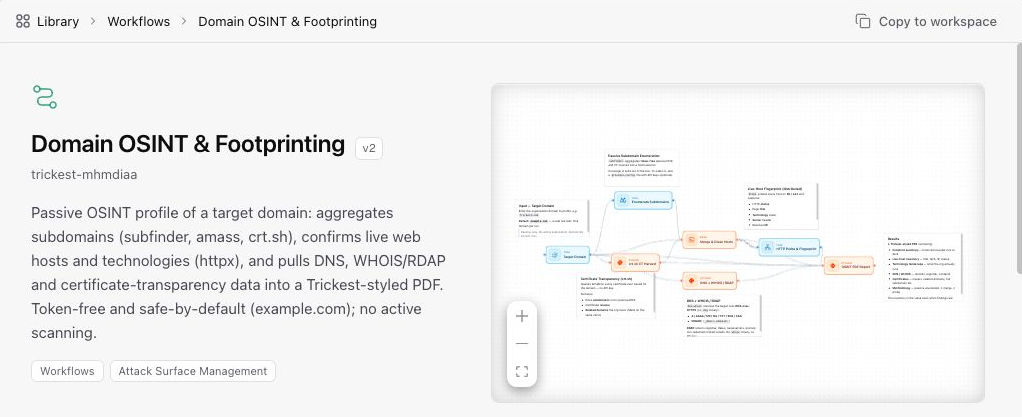
Open **Library**, select **Workflows**, and open a workflow. Read its description and review the graph to understand its purpose. Configured values, when present, appear in **Parameters** below the preview.
The image below shows where to find **Copy to workspace**. Enlarge it to inspect the interface; it is an orientation view, not a guide to each node.
 ## Copy a Workflow From the Library
Select **Copy to workspace**. An inline destination panel opens below the preview. Select the space where you want to save your copy, or use **New space** to create one.
If the space has projects, choose one or select the space's **root** row to save without a project folder. Use **New project** if needed. Spaces without projects skip this selection.
Select **Copy**. The Library page stays open after copying. Select **Open** in the success notification to open your copy in the editor. You can also find it in the destination space or project.
## Prepare your copy to run
[Review the node inputs and configuration](/docs/using-the-app/workflow-and-executions/building-and-debugging-a-workflow#2-configure-and-run-a-single-node). Replace example targets and provide the files or variables your task requires. Use targets you have permission to test.
When changes have saved, follow [Executing and Scheduling Workflows](/docs/using-the-app/workflow-and-executions/executing-and-scheduling-workflows). Running requires execution permission and an available fleet. On the Community plan, [connect a self-hosted machine](/docs/key-concepts/community-plan) first. A model provider key is only needed for agent use, not for copying or manually running a workflow.
After execution, [inspect the run and its outputs](/docs/using-the-app/workflow-and-executions/working-with-runs) to confirm the result.
## If you cannot copy
- **Copy to workspace is missing:** check that you have write access. Ask your administrator if you need access to the destination.
- **The copy fails:** read the error before retrying. If it says to check your workspace, look in the destination first; the workflow may already have been copied.
- **The copy exists but cannot run:** copying and execution are separate actions. Check execution permission and fleet availability before starting it.
---
_Markdown source of https://trickest.com/docs/using-the-app/workflow-and-executions/using-workflows-from-the-library._
## Copy a Workflow From the Library
Select **Copy to workspace**. An inline destination panel opens below the preview. Select the space where you want to save your copy, or use **New space** to create one.
If the space has projects, choose one or select the space's **root** row to save without a project folder. Use **New project** if needed. Spaces without projects skip this selection.
Select **Copy**. The Library page stays open after copying. Select **Open** in the success notification to open your copy in the editor. You can also find it in the destination space or project.
## Prepare your copy to run
[Review the node inputs and configuration](/docs/using-the-app/workflow-and-executions/building-and-debugging-a-workflow#2-configure-and-run-a-single-node). Replace example targets and provide the files or variables your task requires. Use targets you have permission to test.
When changes have saved, follow [Executing and Scheduling Workflows](/docs/using-the-app/workflow-and-executions/executing-and-scheduling-workflows). Running requires execution permission and an available fleet. On the Community plan, [connect a self-hosted machine](/docs/key-concepts/community-plan) first. A model provider key is only needed for agent use, not for copying or manually running a workflow.
After execution, [inspect the run and its outputs](/docs/using-the-app/workflow-and-executions/working-with-runs) to confirm the result.
## If you cannot copy
- **Copy to workspace is missing:** check that you have write access. Ask your administrator if you need access to the destination.
- **The copy fails:** read the error before retrying. If it says to check your workspace, look in the destination first; the workflow may already have been copied.
- **The copy exists but cannot run:** copying and execution are separate actions. Check execution permission and fleet availability before starting it.
---
_Markdown source of https://trickest.com/docs/using-the-app/workflow-and-executions/using-workflows-from-the-library._