---
title: "Uploading Files"
canonical: https://trickest.com/docs/using-the-app/workflow-and-executions/uploading-files
description: "Upload reusable input files to Files, organize them into folders, and select them in a workflow node."
---
# Uploading Files
## Overview
Use **Files** for reusable uploads in the vault's storage. A workflow node can select these files as inputs. This storage is different from a run's output files and from files inside an agent sandbox.
| Location | What it contains |
| --- | --- |
| Files | Uploaded files organized for reuse. |
| A node's Outputs | Files produced by that node in a particular execution. |
| Agent sandbox files | Files in the agent's working environment. |
Uploading a file does not run a workflow or configure every node that might use it.
## Upload files from the Files page
Select **Files** in the main navigation. Check the vault context before uploading.
Open the destination folder, or use **New folder** to organize the upload.
Select **Upload files** and choose the files from your computer. Wait for upload completion, then select a file to inspect it before using it as input.
An upload failure is different from an empty folder. Check the upload status and retry the failed file before configuring a node to use it.
## Upload files from a workflow node
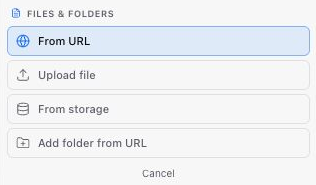
Open the node's input panel and select its file input. Use the file selector to upload a file or choose one already in storage. Confirm the selected filename and check the input description: a file containing JSON is not interchangeable with a line-separated list just because both can be uploaded.
 For output produced by another workflow node, connect the upstream output instead of downloading and uploading it again. See [Building and Debugging a Workflow](./building-and-debugging-a-workflow#4-add-and-connect-a-downstream-node).
Before moving or deleting shared input files, check which workflows use them. Do not treat the Files page as a complete view of every execution's outputs or the agent's sandbox.
---
_Markdown source of https://trickest.com/docs/using-the-app/workflow-and-executions/uploading-files._
For output produced by another workflow node, connect the upstream output instead of downloading and uploading it again. See [Building and Debugging a Workflow](./building-and-debugging-a-workflow#4-add-and-connect-a-downstream-node).
Before moving or deleting shared input files, check which workflows use them. Do not treat the Files page as a complete view of every execution's outputs or the agent's sandbox.
---
_Markdown source of https://trickest.com/docs/using-the-app/workflow-and-executions/uploading-files._