---
title: "Copying Workflows"
canonical: https://trickest.com/docs/using-the-app/workflow-and-executions/copying-workflows
description: "Duplicate a workflow for a separate variation, then move it to the intended workspace or project."
---
# Copying Workflows
## Overview
Duplicate a workflow when you want a separate version to edit. Move a workflow when you want to change where the existing workflow lives. For a published template, follow [Using Workflows From the Library](./using-workflows-from-the-library).
## Duplicate a Workflow
Open **Workflows** and locate the workflow you want to copy. Check its workspace and project so you start from the intended definition.
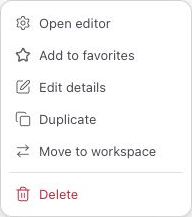
Open the workflow's three-dot menu and select **Duplicate**. The confirmation reads **Duplicated as “NAME”**. Note that name; the page stays on the workflow list.
Find the confirmed name in the refreshed list and select it (or use **Open editor**). Give the copy a recognizable name, and check its inputs and connections before running it.
 The copy starts in the same workspace and project. To put it elsewhere, move it after duplication. You need permission to copy the source and use the destination. Duplication is not a substitute for checking whether credentials, file references and execution settings are appropriate for the new task.
## Move the Duplicated Workflow to a Workspace or Project
Open the copied workflow’s three-dot menu in the workflow list. Select **Move to workspace**, or use the **Move to project** submenu, then choose the destination. The project submenu appears when other projects are available. Confirm where the workflow appears after the move.
Changing workspace changes the context in which references resolve. Recheck workspace variables and secrets before executing. Moving a workflow is different from creating another copy; verify that you selected the duplicate if you want the original to stay where it is.
---
_Markdown source of https://trickest.com/docs/using-the-app/workflow-and-executions/copying-workflows._
The copy starts in the same workspace and project. To put it elsewhere, move it after duplication. You need permission to copy the source and use the destination. Duplication is not a substitute for checking whether credentials, file references and execution settings are appropriate for the new task.
## Move the Duplicated Workflow to a Workspace or Project
Open the copied workflow’s three-dot menu in the workflow list. Select **Move to workspace**, or use the **Move to project** submenu, then choose the destination. The project submenu appears when other projects are available. Confirm where the workflow appears after the move.
Changing workspace changes the context in which references resolve. Recheck workspace variables and secrets before executing. Moving a workflow is different from creating another copy; verify that you selected the duplicate if you want the original to stay where it is.
---
_Markdown source of https://trickest.com/docs/using-the-app/workflow-and-executions/copying-workflows._