---
title: "Connecting a Private Container Registry"
canonical: https://trickest.com/docs/using-the-app/private-execution-networking/connecting-private-registry
description: "Connect a private Docker registry to your Vault so private images can be used in your tools."
---
# Connecting a Private Container Registry
Private container registry integration is available exclusively for [Enterprise](https://trickest.com/pricing/) users. [Contact the account team](/demo) if you need access.
## Overview
Connecting a private container registry lets the platform pull Docker images from it when running private tools. Once connected, images from that registry can be referenced in your [private tool configurations](/docs/using-the-app/private-execution-networking/adding-private-tools) using the stored credentials. Confirm that the credentials can read the image and remain valid.
## Obtaining Credentials
Before connecting a registry, you will need a username and an access token or password. The exact steps depend on your provider:
- [Docker Hub](https://docs.docker.com/security/for-developers/access-tokens/)
- [GitHub Packages](https://docs.github.com/en/packages/working-with-a-github-packages-registry/working-with-the-container-registry#authenticating-to-the-container-registry)
- [AWS ECR](https://docs.aws.amazon.com/AmazonECR/latest/userguide/registry_auth.html#registry-auth-token)
For any other registry that supports the Docker Registry HTTP API, use the username and password or token that grants read access to the relevant images.
If your registry uses expiring credentials, including ECR authorization tokens, replace them before they expire. This integration stores the supplied credentials; it does not automatically renew provider tokens.
## Adding a Registry
Go to **Settings > Infrastructure > Container registries**.
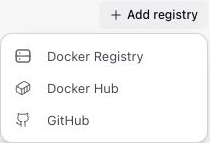
Click **Add registry** in the top-right of the page. A dropdown opens listing the supported registry types: **Docker Registry**, **Docker Hub**, and **GitHub**.
Select the type that matches your provider. The form for that type opens. See the field reference below for what each type requires.
Enter the required fields, then click **Add registry** at the bottom of the form to save the new registry. When editing an existing registry the same button reads **Save changes**.
 ### Docker Registry
Use this for any self-hosted registry or a registry that supports the Docker Registry HTTP API (including AWS ECR).
| Field | Description |
|---|---|
| **Name** | Display name for this registry within the platform. |
| **Registry URL** | Registry address expected by your provider, including its namespace when needed (e.g., `aws_account_id.dkr.ecr.region.amazonaws.com/namespace`). |
| **Username** | Registry username. |
| **Password / Token** | Registry password or access token. |
### Docker Hub
| Field | Description |
|---|---|
| **Name** | Display name for this registry within the platform. |
| **Docker Hub Username** | Your Docker Hub username. |
| **Access Token** | A Docker Hub access token with read access to the relevant images. |
### GitHub
| Field | Description |
|---|---|
| **Name** | Display name for this registry within the platform. |
| **GitHub Username** | Your GitHub username. |
| **Personal Access Token** | A GitHub personal access token with the `read:packages` scope. |
## Managing Connected Registries
All connected registries are listed on the **Container registries** page. Select an entry to inspect its details. Use the registry row's **`...`** menu in the list for **Rename** and **Delete**. Deleting a registry will prevent the platform from pulling images that depend on it.
---
_Markdown source of https://trickest.com/docs/using-the-app/private-execution-networking/connecting-private-registry._
### Docker Registry
Use this for any self-hosted registry or a registry that supports the Docker Registry HTTP API (including AWS ECR).
| Field | Description |
|---|---|
| **Name** | Display name for this registry within the platform. |
| **Registry URL** | Registry address expected by your provider, including its namespace when needed (e.g., `aws_account_id.dkr.ecr.region.amazonaws.com/namespace`). |
| **Username** | Registry username. |
| **Password / Token** | Registry password or access token. |
### Docker Hub
| Field | Description |
|---|---|
| **Name** | Display name for this registry within the platform. |
| **Docker Hub Username** | Your Docker Hub username. |
| **Access Token** | A Docker Hub access token with read access to the relevant images. |
### GitHub
| Field | Description |
|---|---|
| **Name** | Display name for this registry within the platform. |
| **GitHub Username** | Your GitHub username. |
| **Personal Access Token** | A GitHub personal access token with the `read:packages` scope. |
## Managing Connected Registries
All connected registries are listed on the **Container registries** page. Select an entry to inspect its details. Use the registry row's **`...`** menu in the list for **Rename** and **Delete**. Deleting a registry will prevent the platform from pulling images that depend on it.
---
_Markdown source of https://trickest.com/docs/using-the-app/private-execution-networking/connecting-private-registry._