---
title: "Find GitHub Changes for Jira Issues"
canonical: https://trickest.com/docs/using-the-app/connectors/jira-to-github
description: "Search GitHub pull requests, code and commits for issue keys exported from Jira."
---
# Find GitHub Changes for Jira Issues
Use Jira issue keys as search terms in GitHub. The result is a set of candidate code changes to review, with separate branches for pull requests, code and commits.
## Before you start
Complete [Jira: Export issue keys](/docs/using-the-app/connectors/jira) and [GitHub: Search repositories](/docs/using-the-app/connectors/github). Both connectors must be enabled with access to the intended Jira project and GitHub organization. Start with two known issue keys and repositories you can read.
## Build the Jira source
Create a Jira JQL node named `issue-keys`. Select the correct site, use a project-scoped JQL query, and limit the initial result to `2`. Inspect JSON first, then choose **Save as > Lines** with `data.issues[].key` when that path matches the actual response.
For example, the query below selects issues created this week. Replace `YOUR_PROJECT` with your project key.
```text
project = YOUR_PROJECT AND created >= startOfWeek() ORDER BY created DESC
```
Run the node and confirm the key list. An empty source produces no GitHub calls; investigate it before continuing.
## Add three GitHub search branches
Add one node for each tool below. Connect `issue-keys` under **Data** in all three nodes and select **For each line of issue-keys**.
| Tool | Name the node | Query (`query`) |
| --- | --- | --- |
| `search_pull_requests` | `find-pull-requests` | `"{{item}}" org:YOUR_ORG` |
| `search_code` | `find-code` | `"{{item}}" org:YOUR_ORG` |
| `search_commits` | `find-commits` | `"{{item}}" org:YOUR_ORG` |
Replace `YOUR_ORG` with your GitHub organization. Use a known `repo:OWNER/REPO` scope instead when you want to restrict the search to one repository. Keep **Save as** set to **JSON** on all branches, set **Call limit** to `2`, and select **When any call fails**.
Run each branch and inspect its results before executing the full workflow. Two keys across three branches make up to six search calls; provider page limits still apply within each call.
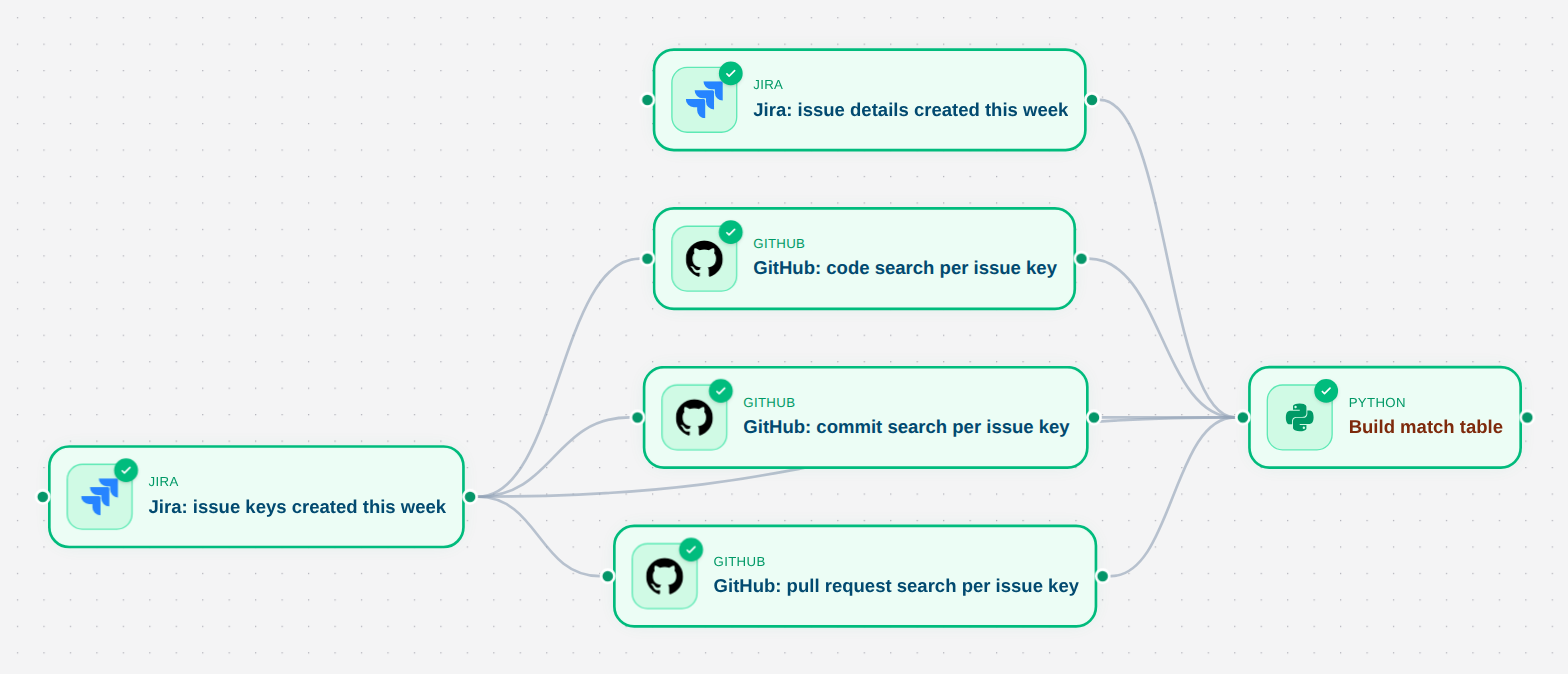 ## Keep issue details beside the searches
For a richer report, add a second Jira JQL node named `issue-details`. Use the same site, query and limit as `issue-keys`, but retain **JSON**. This preserves titles and states while the first node emits only keys.
Connect the issue-details branch and the three GitHub branches to a Python report node. Inspect their actual result shapes, then preserve the search key with each set of matches. A useful report row contains the issue key, match type and GitHub URL; retain unmatched keys too. [Using scripts](/docs/using-the-app/workflow-and-executions/using-scripts) covers connecting and reading the files.
## Review the matches
Open a known issue and check its expected GitHub link against the workflow output. A key mentioned in code or a commit is a candidate relationship, not proof that the issue was fixed. Deduplicate repeated URLs and keep the match type so a reviewer can follow the evidence.
No matches can mean no literal key reference, insufficient access, an overly narrow organization scope, or a search limit. A failed branch must remain visible in the report rather than being summarized as zero matches.
The screenshot is a historical saved workflow. The local review connections require renewed authentication before a fresh end-to-end verification; this tutorial does not claim current Jira or GitHub execution.
The [companion report workflow](/docs/using-the-app/connectors/workflow-examples) supplies the Python formatter, including explicit unmatched rows.
---
_Markdown source of https://trickest.com/docs/using-the-app/connectors/jira-to-github._
## Keep issue details beside the searches
For a richer report, add a second Jira JQL node named `issue-details`. Use the same site, query and limit as `issue-keys`, but retain **JSON**. This preserves titles and states while the first node emits only keys.
Connect the issue-details branch and the three GitHub branches to a Python report node. Inspect their actual result shapes, then preserve the search key with each set of matches. A useful report row contains the issue key, match type and GitHub URL; retain unmatched keys too. [Using scripts](/docs/using-the-app/workflow-and-executions/using-scripts) covers connecting and reading the files.
## Review the matches
Open a known issue and check its expected GitHub link against the workflow output. A key mentioned in code or a commit is a candidate relationship, not proof that the issue was fixed. Deduplicate repeated URLs and keep the match type so a reviewer can follow the evidence.
No matches can mean no literal key reference, insufficient access, an overly narrow organization scope, or a search limit. A failed branch must remain visible in the report rather than being summarized as zero matches.
The screenshot is a historical saved workflow. The local review connections require renewed authentication before a fresh end-to-end verification; this tutorial does not claim current Jira or GitHub execution.
The [companion report workflow](/docs/using-the-app/connectors/workflow-examples) supplies the Python formatter, including explicit unmatched rows.
---
_Markdown source of https://trickest.com/docs/using-the-app/connectors/jira-to-github._