---
title: "HackerOne: Collect Program Reports"
canonical: https://trickest.com/docs/using-the-app/connectors/hackerone
description: "Connect an organization token, list program handles, and fetch reports for each program."
---
# HackerOne: Collect Program Reports
List the HackerOne programs available to an organization token, then retrieve a small report sample for each program. Trickest provides this HackerOne adapter; it is not an official HackerOne-hosted MCP server.
## Before you start
You need an Enterprise vault, a vault administrator to add the connector, and a HackerOne organization API token with Report Management rights. Keep both the token's identifier and secret available through your normal credential process. Workflow editing and execution access are also required.
Connector settings and tool discovery also require Managed AI or BYOK access with a verified provider key. Check the [shared access requirements](/docs/using-the-app/connectors#before-you-start) before setup.
## Connect HackerOne
1. Open **Settings > Infrastructure > Connectors** and select **Add connector > HackerOne**, or open the HackerOne preset in the directory.
2. Select **Use a token**.
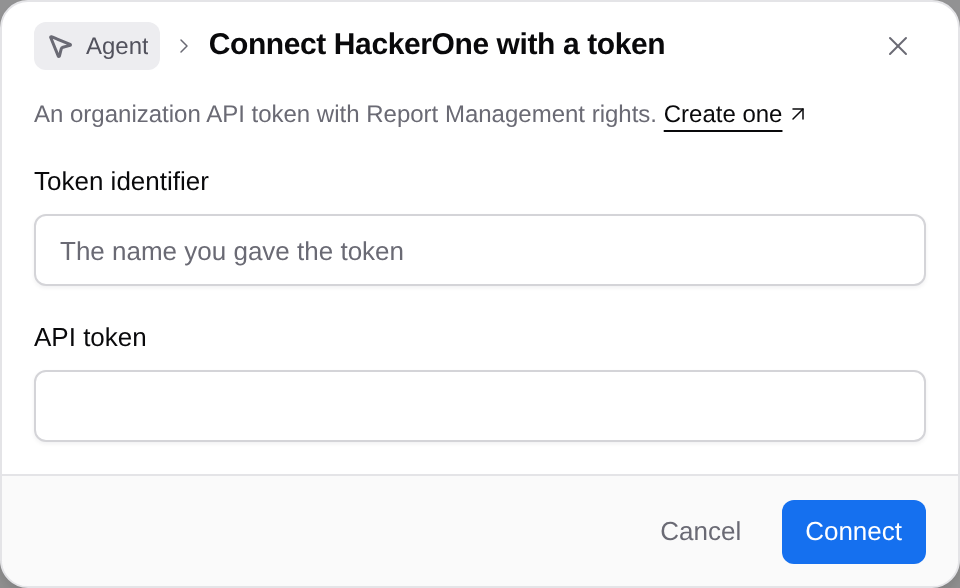
3. Enter the **Token identifier** created for the organization token and its **API token** secret. The identifier is not your username or account email.
4. Select **Connect**. Trickest saves and tests the connection before enabling it. For an existing token connection, use **Replace token** and **Replace and test**.
 HackerOne's [API token guide](https://docs.hackerone.com/en/articles/8544782-api-tokens) explains token creation and permissions. Choose a token whose program access is appropriate for other vault members using this connection.
## List the available programs
Create a workflow and add the HackerOne tool `list_programs`. Name it `programs` and configure:
| Setting | Value |
| --- | --- |
| **Run** | **Once** |
| **Limit** (`limit`) | `2` |
| **Save as** | **JSON** for the first test |
Run the node and inspect the returned programs. When its result contains `items` with program handles, change **Save as** to **Lines**, set **Field path** to `items[].handle`, and run again. Check the handles before using them in the next node.
## Fetch reports for each program
Add `list_reports`, name it `reports`, and set:
| Setting | Value |
| --- | --- |
| **Data** | Connect `programs` output |
| **Run** | **For each line of programs** |
| **Program** (`program`) | `{{item}}` |
| **Limit** (`limit`) | `5` |
| **Call limit** | `2` |
| **Node fails** | **When any call fails** |
| **Save as** | **JSON** |
Run `reports` after the program list succeeds. Inspect the result for each handle and any failed call.
HackerOne's [API token guide](https://docs.hackerone.com/en/articles/8544782-api-tokens) explains token creation and permissions. Choose a token whose program access is appropriate for other vault members using this connection.
## List the available programs
Create a workflow and add the HackerOne tool `list_programs`. Name it `programs` and configure:
| Setting | Value |
| --- | --- |
| **Run** | **Once** |
| **Limit** (`limit`) | `2` |
| **Save as** | **JSON** for the first test |
Run the node and inspect the returned programs. When its result contains `items` with program handles, change **Save as** to **Lines**, set **Field path** to `items[].handle`, and run again. Check the handles before using them in the next node.
## Fetch reports for each program
Add `list_reports`, name it `reports`, and set:
| Setting | Value |
| --- | --- |
| **Data** | Connect `programs` output |
| **Run** | **For each line of programs** |
| **Program** (`program`) | `{{item}}` |
| **Limit** (`limit`) | `5` |
| **Call limit** | `2` |
| **Node fails** | **When any call fails** |
| **Save as** | **JSON** |
Run `reports` after the program list succeeds. Inspect the result for each handle and any failed call.
 ## Use the reports
Connect the JSON result to a Python step when you need a table with stable fields such as program handle, report ID and state. Inspect the actual response before choosing the fields; keep identifiers so later steps can deduplicate records.
The two-program, five-report settings are a small sample. They do not establish that all programs or reports were collected. Check pagination and reconcile per-program counts before using the workflow as an inventory.
## If the call fails
A rejected credential can mean the token identifier is wrong, the token expired, or it lacks organization permissions. Use the identifier from the token record, then have an administrator replace and test the token. If only one program fails, inspect that call's error and access separately.
The screenshot shows a saved example and its historical run state. No new report collection is claimed here. Continue with [Reports to a Slack summary](/docs/using-the-app/connectors/reports-to-slack) after the read workflow works.
---
_Markdown source of https://trickest.com/docs/using-the-app/connectors/hackerone._
## Use the reports
Connect the JSON result to a Python step when you need a table with stable fields such as program handle, report ID and state. Inspect the actual response before choosing the fields; keep identifiers so later steps can deduplicate records.
The two-program, five-report settings are a small sample. They do not establish that all programs or reports were collected. Check pagination and reconcile per-program counts before using the workflow as an inventory.
## If the call fails
A rejected credential can mean the token identifier is wrong, the token expired, or it lacks organization permissions. Use the identifier from the token record, then have an administrator replace and test the token. If only one program fails, inspect that call's error and access separately.
The screenshot shows a saved example and its historical run state. No new report collection is claimed here. Continue with [Reports to a Slack summary](/docs/using-the-app/connectors/reports-to-slack) after the read workflow works.
---
_Markdown source of https://trickest.com/docs/using-the-app/connectors/hackerone._