---
title: "GitHub: Search Repositories"
canonical: https://trickest.com/docs/using-the-app/connectors/github
description: "Connect GitHub, run one repository search per query, and pass repository names to the next node."
---
# GitHub: Search Repositories
Use a GitHub connector to turn a short list of search queries into repository names. This workflow reads GitHub; it does not create issues or change repository content.
## Before you start
You need an Enterprise vault and a vault administrator to connect GitHub. The selected GitHub account must be able to read the repositories you want to search. You also need permission to edit and execute a workflow.
Connector settings and tool discovery also require Managed AI or BYOK access with a verified provider key. Check the [shared access requirements](/docs/using-the-app/connectors#before-you-start) before setup.
## Connect GitHub
1. Open **Settings > Infrastructure > Connectors**. Select **Add connector > GitHub**, or open an existing GitHub connection.
2. Select **Connect to Trickest** and complete GitHub authorization for the intended account. An expired connection offers **Reconnect**.
3. Return to Trickest and wait for tool discovery. Check that the connection is on and that the repository search tool appears.
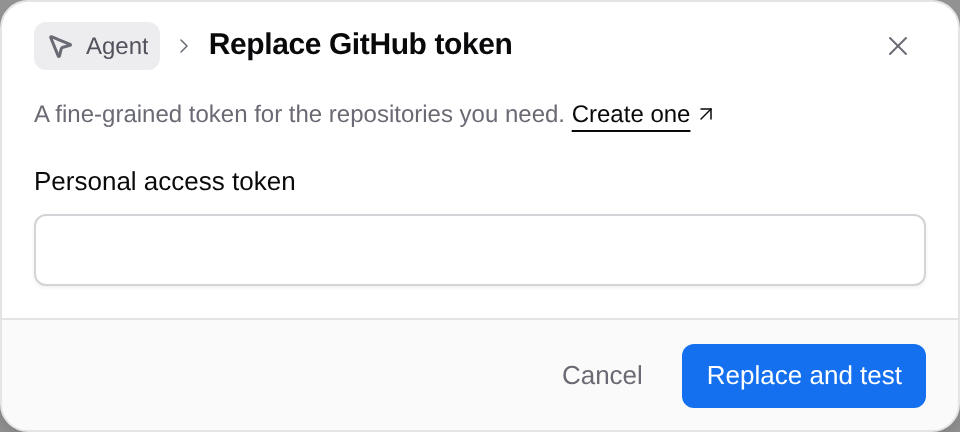
For token authentication, use **Use a token**, or **Use a token instead** in an existing connection's menu. Enter a fine-grained **Personal access token** for the repositories you need, then select **Connect** or **Replace and test**. Trickest tests a new token before enabling the connection. Repository and organization access still follow the token's permissions. See [GitHub's MCP setup reference](https://github.com/github/github-mcp-server/blob/main/docs/host-integration.md).
 ## Create two search queries
Create a workflow, add a Python script node, and name it `queries`. Paste this script:
```python
from pathlib import Path
Path("out").mkdir(exist_ok=True)
Path("out/output.txt").write_text(
"org:trickest wordlist\norg:trickest topic:security\n"
)
```
These are public search inputs. Replace them with queries for your own repositories when needed. Run `queries` and check that its file has two lines.
## Search once per line
Use **Add node** to select GitHub's **Search repositories** tool (`search_repositories`). Open its inspector and apply these settings:
| Setting | Value |
| --- | --- |
| **Data** | Connect the file output of `queries` |
| **Run** | **For each line of queries** |
| **Query** (`query`) | `{{item}}` |
| **Per page** (`perPage`), under **Add option** if hidden | `5` |
| **Limits and failures > Call limit** | `2` |
| **Node fails** | **When any call fails** |
| **Save as** | **JSON** for the first test |
Run the search node. Inspect each call's result, then select **Save as > Lines** and set **Field path** to `items[].full_name` if that matches the returned JSON. Run again to produce one repository name per line.
## Create two search queries
Create a workflow, add a Python script node, and name it `queries`. Paste this script:
```python
from pathlib import Path
Path("out").mkdir(exist_ok=True)
Path("out/output.txt").write_text(
"org:trickest wordlist\norg:trickest topic:security\n"
)
```
These are public search inputs. Replace them with queries for your own repositories when needed. Run `queries` and check that its file has two lines.
## Search once per line
Use **Add node** to select GitHub's **Search repositories** tool (`search_repositories`). Open its inspector and apply these settings:
| Setting | Value |
| --- | --- |
| **Data** | Connect the file output of `queries` |
| **Run** | **For each line of queries** |
| **Query** (`query`) | `{{item}}` |
| **Per page** (`perPage`), under **Add option** if hidden | `5` |
| **Limits and failures > Call limit** | `2` |
| **Node fails** | **When any call fails** |
| **Save as** | **JSON** for the first test |
Run the search node. Inspect each call's result, then select **Save as > Lines** and set **Field path** to `items[].full_name` if that matches the returned JSON. Run again to produce one repository name per line.
 ## Use the repository list
Connect the search output to the next node under **Data**. A later GitHub tool can run once per repository name; a script can deduplicate the list before further processing. The saved example includes a Python consumer, but the search result is already usable without it.
Check **Files** for `out/output.txt` and compare the names with the raw search results. The same repository can match both queries. A page size of `5` is a sample, not an exhaustive inventory; handle additional pages before relying on completeness.
## If the search is unavailable
Open GitHub in **Connectors**. Use **Reconnect** for expired sign-in or **Check connection** when that action is available. If the account is connected but the tool is missing, inspect the discovered catalog before replacing the node. Private-repository omissions can also come from repository selection or organization authorization.
The local review capture retains a historical search result. At the time of authoring, the saved node reported **Tool unavailable** and the account check required reconnection. This tutorial's new search was not executed against GitHub.
For shared input and failure controls, see [Using connectors in workflows](/docs/using-the-app/connectors/using-connectors-in-workflows). Continue with [Jira keys to GitHub searches](/docs/using-the-app/connectors/jira-to-github) to search for related code changes.
---
_Markdown source of https://trickest.com/docs/using-the-app/connectors/github._
## Use the repository list
Connect the search output to the next node under **Data**. A later GitHub tool can run once per repository name; a script can deduplicate the list before further processing. The saved example includes a Python consumer, but the search result is already usable without it.
Check **Files** for `out/output.txt` and compare the names with the raw search results. The same repository can match both queries. A page size of `5` is a sample, not an exhaustive inventory; handle additional pages before relying on completeness.
## If the search is unavailable
Open GitHub in **Connectors**. Use **Reconnect** for expired sign-in or **Check connection** when that action is available. If the account is connected but the tool is missing, inspect the discovered catalog before replacing the node. Private-repository omissions can also come from repository selection or organization authorization.
The local review capture retains a historical search result. At the time of authoring, the saved node reported **Tool unavailable** and the account check required reconnection. This tutorial's new search was not executed against GitHub.
For shared input and failure controls, see [Using connectors in workflows](/docs/using-the-app/connectors/using-connectors-in-workflows). Continue with [Jira keys to GitHub searches](/docs/using-the-app/connectors/jira-to-github) to search for related code changes.
---
_Markdown source of https://trickest.com/docs/using-the-app/connectors/github._