---
title: "Connectors and MCP"
canonical: https://trickest.com/docs/using-the-app/connectors
description: "Connect external tools once, then use them in the Agent and workflow nodes."
---
# Connectors and MCP
Connectors give the Agent and workflow nodes access to tools from another service through the Model Context Protocol (MCP). For example, a workflow can search Notion, fetch each matching page, and pass the results to a script.
## Before you start
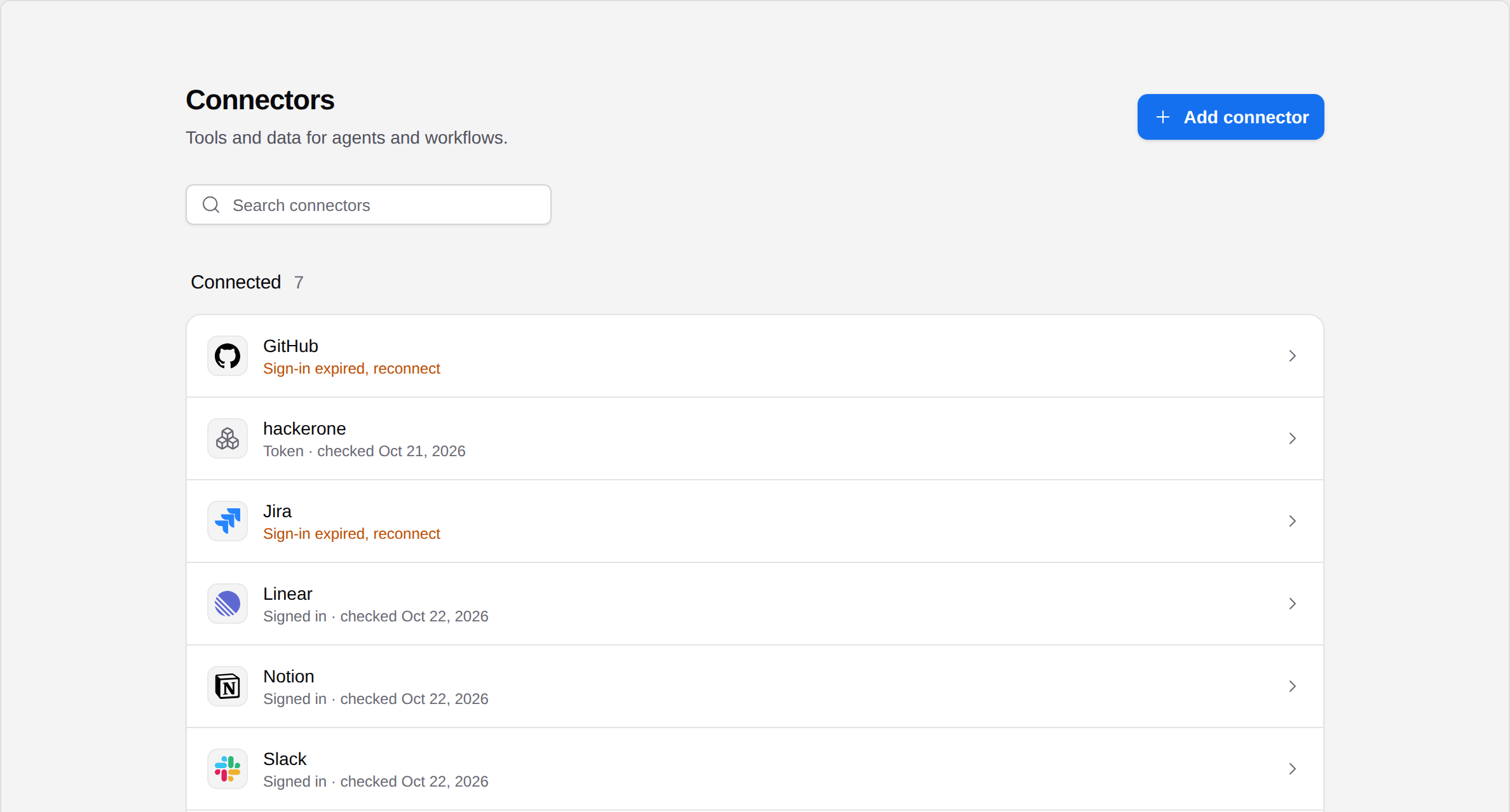
You need an Enterprise vault. A vault administrator adds and manages connections; members with workflow access can use the enabled tools. Open **Settings > Infrastructure > Connectors** to see what is available.
This release also requires [Managed AI](/docs/key-concepts/agent/managed-ai) or [BYOK access with a verified provider key](/docs/using-the-app/agent/bring-your-own-key) to open connector settings and discover tools. Enterprise access alone does not satisfy that gate.
External connectors use the account or token saved for the vault. Other members use that same external account when they call its tools. Choose an account with access appropriate for the people who will use the connection.
 ## Choose a tutorial
Each provider guide covers connection setup and a small workflow you can build.
| Connector | Tutorial | Sign-in options |
| --- | --- | --- |
| [GitHub](/docs/using-the-app/connectors/github) | Search repositories from a list of queries | OAuth or personal access token |
| [Linear](/docs/using-the-app/connectors/linear) | Collect issues for a team and assignee | OAuth or API key |
| [Notion](/docs/using-the-app/connectors/notion) | Search for pages, then fetch each match | OAuth |
| [Jira](/docs/using-the-app/connectors/jira) | Export issue keys from a JQL search | OAuth or an allowed API token |
| [Slack](/docs/using-the-app/connectors/slack) | Find a channel and read recent messages | OAuth |
| [HackerOne](/docs/using-the-app/connectors/hackerone) | List programs and fetch their reports | Organization API token |
| [Trickest](/docs/using-the-app/connectors/trickest) | List workflows and fetch their definitions | Your own Trickest access |
For a service outside this list, [connect a custom MCP server](/docs/using-the-app/agent/connecting-a-custom-mcp-server).
## Build a workflow with the connection
Start with [Using connectors in workflows](/docs/using-the-app/connectors/using-connectors-in-workflows). It explains fixed inputs, one call per input line, output field paths, and partial failures.
Then combine services with [Jira issue keys to GitHub searches](/docs/using-the-app/connectors/jira-to-github) or [HackerOne reports to a Slack summary](/docs/using-the-app/connectors/reports-to-slack).
## Use the connection in the Agent
After an administrator connects and enables a service, its tools become available to the Agent. State the task and scope, such as “Find Notion pages with workflow in the title, and summarize their titles and links.” Review any permission request before allowing a tool call. See [Using the Agent](/docs/using-the-app/agent/using-the-agent).
For repeatable steps, use connector nodes in a workflow. Each node selects one tool and records its inputs and output settings.
## If a connector is unavailable
Open its settings page. **Reconnect** means its saved sign-in needs attention. A connection that is turned off must be enabled by an administrator after a successful test. An upgrade or access message requires the appropriate plan or role.
The tool list comes from the connected server. A connected account does not guarantee that a saved tool still exists, or that the account can read a particular repository, page, or channel.
## Repeat the task or start from a file
Use [Download workflow examples](/docs/using-the-app/connectors/workflow-examples) for portable Agent recipes and native fixture imports. [Collect new HackerOne reports on a schedule](/docs/using-the-app/connectors/recurring-collection) adds persistent state and replay checks. For a conversational task, follow [Use MCP connectors with the Agent](/docs/using-the-app/agent/using-mcp-connectors).
---
_Markdown source of https://trickest.com/docs/using-the-app/connectors._
## Choose a tutorial
Each provider guide covers connection setup and a small workflow you can build.
| Connector | Tutorial | Sign-in options |
| --- | --- | --- |
| [GitHub](/docs/using-the-app/connectors/github) | Search repositories from a list of queries | OAuth or personal access token |
| [Linear](/docs/using-the-app/connectors/linear) | Collect issues for a team and assignee | OAuth or API key |
| [Notion](/docs/using-the-app/connectors/notion) | Search for pages, then fetch each match | OAuth |
| [Jira](/docs/using-the-app/connectors/jira) | Export issue keys from a JQL search | OAuth or an allowed API token |
| [Slack](/docs/using-the-app/connectors/slack) | Find a channel and read recent messages | OAuth |
| [HackerOne](/docs/using-the-app/connectors/hackerone) | List programs and fetch their reports | Organization API token |
| [Trickest](/docs/using-the-app/connectors/trickest) | List workflows and fetch their definitions | Your own Trickest access |
For a service outside this list, [connect a custom MCP server](/docs/using-the-app/agent/connecting-a-custom-mcp-server).
## Build a workflow with the connection
Start with [Using connectors in workflows](/docs/using-the-app/connectors/using-connectors-in-workflows). It explains fixed inputs, one call per input line, output field paths, and partial failures.
Then combine services with [Jira issue keys to GitHub searches](/docs/using-the-app/connectors/jira-to-github) or [HackerOne reports to a Slack summary](/docs/using-the-app/connectors/reports-to-slack).
## Use the connection in the Agent
After an administrator connects and enables a service, its tools become available to the Agent. State the task and scope, such as “Find Notion pages with workflow in the title, and summarize their titles and links.” Review any permission request before allowing a tool call. See [Using the Agent](/docs/using-the-app/agent/using-the-agent).
For repeatable steps, use connector nodes in a workflow. Each node selects one tool and records its inputs and output settings.
## If a connector is unavailable
Open its settings page. **Reconnect** means its saved sign-in needs attention. A connection that is turned off must be enabled by an administrator after a successful test. An upgrade or access message requires the appropriate plan or role.
The tool list comes from the connected server. A connected account does not guarantee that a saved tool still exists, or that the account can read a particular repository, page, or channel.
## Repeat the task or start from a file
Use [Download workflow examples](/docs/using-the-app/connectors/workflow-examples) for portable Agent recipes and native fixture imports. [Collect new HackerOne reports on a schedule](/docs/using-the-app/connectors/recurring-collection) adds persistent state and replay checks. For a conversational task, follow [Use MCP connectors with the Agent](/docs/using-the-app/agent/using-mcp-connectors).
---
_Markdown source of https://trickest.com/docs/using-the-app/connectors._