---
title: "Generating Structured Data"
canonical: https://trickest.com/docs/using-the-app/agent/generating-structured-data
description: "Generate one JSON object per case and verify schema, errors and coverage."
---
# Generating Structured Data
## What you will build
Turn a small set of issue summaries into structured JSON that a later node can read. Each case keeps a stable `case_id`, so you can join results back to its source. Use [Agent mode](/docs/using-the-app/agent/adding-an-ai-agent-node) for an open-ended tool task and [Evaluate](/docs/using-the-app/agent/evaluating-evidence) for typed judgments over evidence.
## Check availability
Open an AI node’s **Setup**. These modes appear only when the node’s tool registration exposes the corresponding inputs. Some AI Agent registrations offer **Agent** alone. If the requested mode is absent, ask your vault administrator for a compatible tool registration; changing a prompt does not add it.
Generate and Evaluate execution require the deployment’s managed AI gateway and model access. Ordinary provider-key chat access alone does not establish access to these operations. Check the selected vault, policy and budget before a paid run.
 ## Prepare two cases
Download [generation-cases.jsonl](/docs/examples/release-1.2.1/generation-cases.jsonl), [generation-instructions.txt](/docs/examples/release-1.2.1/generation-instructions.txt) and [generation-schema.json](/docs/examples/release-1.2.1/generation-schema.json). These are synthetic inputs, not model results.
```jsonl
{"case_id":"jira-101","input":{"source":"jira","text":"A test issue needs a reviewer."}}
{"case_id":"h1-202","input":{"source":"hackerone","text":"A synthetic report has no triage decision yet."}}
```
Keep one complete JSON object per line. `case_id` must be a unique, nonempty string. `input` is nonempty text, an object or an array. Keep requests below 4 MiB per case.
The shared instructions ask for `summary`, `source` and `needs_review`. The shared schema requires an object containing those fields, a known source category and no extra properties. Use a simple supported JSON Schema; this operation rejects references such as `$ref` and pattern-based schema keywords.
## Connect the inputs
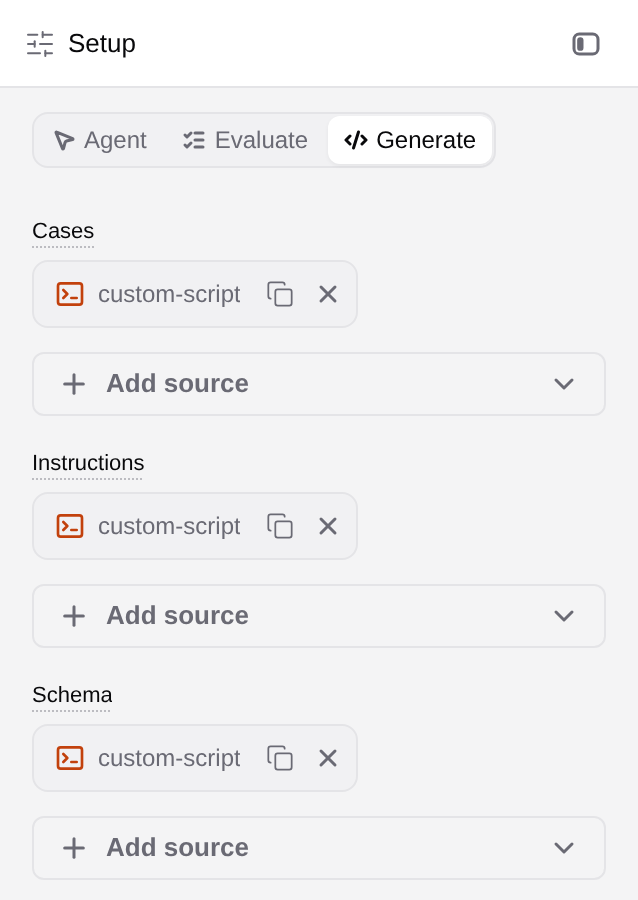
Add upstream file-producing nodes or upload the example files into your workflow’s intended inputs. Open the AI node and select **Generate**. If switching modes asks to clear inputs, review the affected fields before confirming; use a separate node when you need to preserve an existing configuration.
Connect the JSONL file to **Cases**, the text file to **Instructions**, and the schema file to **Schema**. Shared instructions and schema fill omitted per-case fields. To use different definitions per case, put `instructions` or `schema` in each row and leave the corresponding shared input disconnected. Do not supply both forms for the same field.
Choose an entitled **text model** in **Model**. Jev belongs to Evaluate and cannot generate these objects. Start with **Parallel** set to 1 and a small **Token cap** sufficient for the short object. The UI supports parallelism from 1 to 32 and token caps from 1 to 32000; entitlement and provider limits can be stricter. Leave **Reasoning** at its default unless the chosen model supports the setting you need.
## Validate before making AI requests
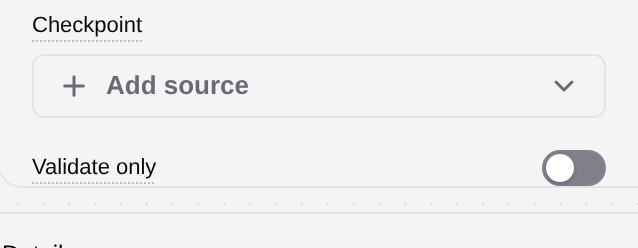
Turn on **Validate only**, then run the configured node on the small sample. Inspect the validation file and its case count. This checks case structure without AI requests; it does not test model entitlement, available budget, answer quality or every provider’s schema support.
## Prepare two cases
Download [generation-cases.jsonl](/docs/examples/release-1.2.1/generation-cases.jsonl), [generation-instructions.txt](/docs/examples/release-1.2.1/generation-instructions.txt) and [generation-schema.json](/docs/examples/release-1.2.1/generation-schema.json). These are synthetic inputs, not model results.
```jsonl
{"case_id":"jira-101","input":{"source":"jira","text":"A test issue needs a reviewer."}}
{"case_id":"h1-202","input":{"source":"hackerone","text":"A synthetic report has no triage decision yet."}}
```
Keep one complete JSON object per line. `case_id` must be a unique, nonempty string. `input` is nonempty text, an object or an array. Keep requests below 4 MiB per case.
The shared instructions ask for `summary`, `source` and `needs_review`. The shared schema requires an object containing those fields, a known source category and no extra properties. Use a simple supported JSON Schema; this operation rejects references such as `$ref` and pattern-based schema keywords.
## Connect the inputs
Add upstream file-producing nodes or upload the example files into your workflow’s intended inputs. Open the AI node and select **Generate**. If switching modes asks to clear inputs, review the affected fields before confirming; use a separate node when you need to preserve an existing configuration.
Connect the JSONL file to **Cases**, the text file to **Instructions**, and the schema file to **Schema**. Shared instructions and schema fill omitted per-case fields. To use different definitions per case, put `instructions` or `schema` in each row and leave the corresponding shared input disconnected. Do not supply both forms for the same field.
Choose an entitled **text model** in **Model**. Jev belongs to Evaluate and cannot generate these objects. Start with **Parallel** set to 1 and a small **Token cap** sufficient for the short object. The UI supports parallelism from 1 to 32 and token caps from 1 to 32000; entitlement and provider limits can be stricter. Leave **Reasoning** at its default unless the chosen model supports the setting you need.
## Validate before making AI requests
Turn on **Validate only**, then run the configured node on the small sample. Inspect the validation file and its case count. This checks case structure without AI requests; it does not test model entitlement, available budget, answer quality or every provider’s schema support.
 For Generate, the expected file is `generation_validation.json`, with `status: "valid"`, two cases and `ai_requests: 0`. Correct any input error before turning Validate only off.
## Inspect a small generated run
After reviewing the model and budget, turn off Validate only and execute the two cases. Open the node’s output folder:
| File | What to inspect |
| --- | --- |
| `generations.jsonl` | Successful objects under `output`, with their `case_id`, model and usage metadata |
| `generation_errors.jsonl` | Cases that did not produce a usable result |
| `generation_retries.jsonl` | Recorded retry input for failed cases |
| `generation_summary.jsonl` | Expected, succeeded and failed counts and completion status |
Compare input IDs with successful and failed IDs. Each admitted case must be accounted for exactly once; a green node alone does not establish complete coverage. Check the object against the schema and read its content for factual accuracy. A valid object can still contain an incorrect summary.
## Resume deliberately
Connect a previous output folder to **Checkpoint** when resuming the same work. Reuse depends on the case ID, input, instructions, schema and model matching the stored fingerprint. A changed case needs a new answer. Keep the original outputs and inspect uncertain failures before retrying: a missing local result does not prove a provider request was unbilled.
The downloadable cases were checked offline against the compatible tool’s input contract. No model generation was executed for this local tutorial review. Output names here describe that contract; verify the selected tool version when its files differ.
---
_Markdown source of https://trickest.com/docs/using-the-app/agent/generating-structured-data._
For Generate, the expected file is `generation_validation.json`, with `status: "valid"`, two cases and `ai_requests: 0`. Correct any input error before turning Validate only off.
## Inspect a small generated run
After reviewing the model and budget, turn off Validate only and execute the two cases. Open the node’s output folder:
| File | What to inspect |
| --- | --- |
| `generations.jsonl` | Successful objects under `output`, with their `case_id`, model and usage metadata |
| `generation_errors.jsonl` | Cases that did not produce a usable result |
| `generation_retries.jsonl` | Recorded retry input for failed cases |
| `generation_summary.jsonl` | Expected, succeeded and failed counts and completion status |
Compare input IDs with successful and failed IDs. Each admitted case must be accounted for exactly once; a green node alone does not establish complete coverage. Check the object against the schema and read its content for factual accuracy. A valid object can still contain an incorrect summary.
## Resume deliberately
Connect a previous output folder to **Checkpoint** when resuming the same work. Reuse depends on the case ID, input, instructions, schema and model matching the stored fingerprint. A changed case needs a new answer. Keep the original outputs and inspect uncertain failures before retrying: a missing local result does not prove a provider request was unbilled.
The downloadable cases were checked offline against the compatible tool’s input contract. No model generation was executed for this local tutorial review. Output names here describe that contract; verify the selected tool version when its files differ.
---
_Markdown source of https://trickest.com/docs/using-the-app/agent/generating-structured-data._