---
title: "Configuring Agent Hooks"
canonical: https://trickest.com/docs/using-the-app/agent/configuring-agent-hooks
description: "Configure a vault’s Agent hooks and choose the event and action they run."
---
# Configuring Agent Hooks
## Before you start
An Agent hook runs an action when a selected Agent event occurs. Use one to enforce a rule around tool activity or notify another system after an event. The Agent also works without hooks.
Open **Settings > Agent > Hooks**. The page title is **Agent hooks**. The section appears when the selected vault has Agent access. Creating, changing, enabling or deleting a hook requires a vault owner or platform administrator. A visible form does not grant permission to save it.
 ## Add a hook
Select **Add hook**. Choose the **Event**, such as `PreToolUse` or `Stop`. **Matcher** is optional: leave it empty to match every occurrence of that event, or use a tool name or regular expression to narrow it.
Choose a **Runtime** and complete its fields:
| Runtime | Required setup |
| --- | --- |
| `command` | A **Command** that runs in the vault’s sandbox. Hook input arrives on stdin as JSON. For a blocking `PreToolUse` hook, exit 2 indicates denial; exit 0 allows the action. |
| `http` | A **URL** whose host is permitted by this deployment’s hook allowlist. Optional **Headers** use one `Name: value` per line. |
| `callback` | A **Callback id** for a handler registered by the deployment. Ask its operator for the appropriate ID. |
Credential headers such as **Authorization** or **X-API-Key** must reference a deployment worker secret. For example:
```text
Authorization: ${HOOK_SECRET_MYHOOK}
```
Ask the deployment operator to configure that named secret. Do not paste its value into Headers. Hook references use the `${HOOK_SECRET_…}` format; workflow references such as `${{secrets.NAME}}` belong to a different surface.
## Add a hook
Select **Add hook**. Choose the **Event**, such as `PreToolUse` or `Stop`. **Matcher** is optional: leave it empty to match every occurrence of that event, or use a tool name or regular expression to narrow it.
Choose a **Runtime** and complete its fields:
| Runtime | Required setup |
| --- | --- |
| `command` | A **Command** that runs in the vault’s sandbox. Hook input arrives on stdin as JSON. For a blocking `PreToolUse` hook, exit 2 indicates denial; exit 0 allows the action. |
| `http` | A **URL** whose host is permitted by this deployment’s hook allowlist. Optional **Headers** use one `Name: value` per line. |
| `callback` | A **Callback id** for a handler registered by the deployment. Ask its operator for the appropriate ID. |
Credential headers such as **Authorization** or **X-API-Key** must reference a deployment worker secret. For example:
```text
Authorization: ${HOOK_SECRET_MYHOOK}
```
Ask the deployment operator to configure that named secret. Do not paste its value into Headers. Hook references use the `${HOOK_SECRET_…}` format; workflow references such as `${{secrets.NAME}}` belong to a different surface.
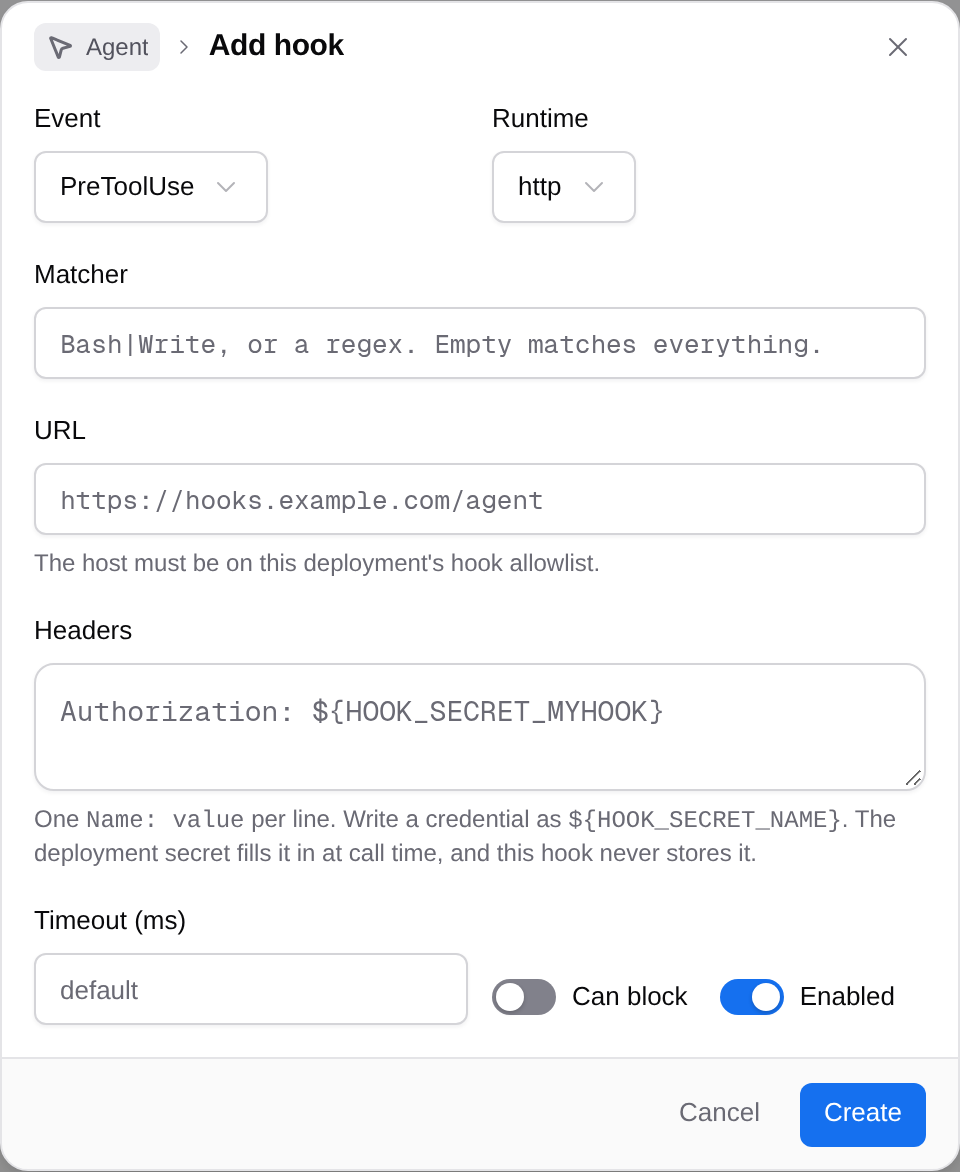 Keep **Timeout (ms)** at its default unless the action needs a different limit. Turn on **Can block** for an event that supports blocking, such as `PreToolUse`, when the hook should be allowed to stop it. **Enabled** controls whether the saved hook runs.
Review the event and target, then select **Create**. Verify that the hook appears with the intended enabled state. Creating a hook stores its configuration; it does not demonstrate that a later event invoked it successfully.
## Change or remove a hook
The row’s switch turns the saved hook on or off. **Edit hook** opens its form; select **Save** to store changes.
**Delete hook** removes the selected hook. Check its event and target before selecting that action.
## If saving or execution fails
| Problem | What to check |
| --- | --- |
| Saving returns a permissions error | Confirm the selected vault and ask its owner or a platform administrator to make the change. |
| A URL is rejected | Ask the deployment operator to check the hook allowlist and permitted destination. |
| A credential header is rejected | Use the exact `${HOOK_SECRET_…}` reference syntax and have the operator configure the named worker secret. |
| An event does not produce the expected action | Check Enabled, Event, Matcher and the target runtime. A saved row alone is not execution evidence. |
---
_Markdown source of https://trickest.com/docs/using-the-app/agent/configuring-agent-hooks._
Keep **Timeout (ms)** at its default unless the action needs a different limit. Turn on **Can block** for an event that supports blocking, such as `PreToolUse`, when the hook should be allowed to stop it. **Enabled** controls whether the saved hook runs.
Review the event and target, then select **Create**. Verify that the hook appears with the intended enabled state. Creating a hook stores its configuration; it does not demonstrate that a later event invoked it successfully.
## Change or remove a hook
The row’s switch turns the saved hook on or off. **Edit hook** opens its form; select **Save** to store changes.
**Delete hook** removes the selected hook. Check its event and target before selecting that action.
## If saving or execution fails
| Problem | What to check |
| --- | --- |
| Saving returns a permissions error | Confirm the selected vault and ask its owner or a platform administrator to make the change. |
| A URL is rejected | Ask the deployment operator to check the hook allowlist and permitted destination. |
| A credential header is rejected | Use the exact `${HOOK_SECRET_…}` reference syntax and have the operator configure the named worker secret. |
| An event does not produce the expected action | Check Enabled, Event, Matcher and the target runtime. A saved row alone is not execution evidence. |
---
_Markdown source of https://trickest.com/docs/using-the-app/agent/configuring-agent-hooks._